AI has entered the graphic design industry like a turbo button. It can generate concepts in seconds, expand backgrounds, remove distractions, create mood boards, test color directions, suggest layouts, and help designers escape the blank-page problem. For social media creators, marketing teams, web designers, and freelancers, this is a huge shift. What once took hours of rough exploration can now happen in minutes.
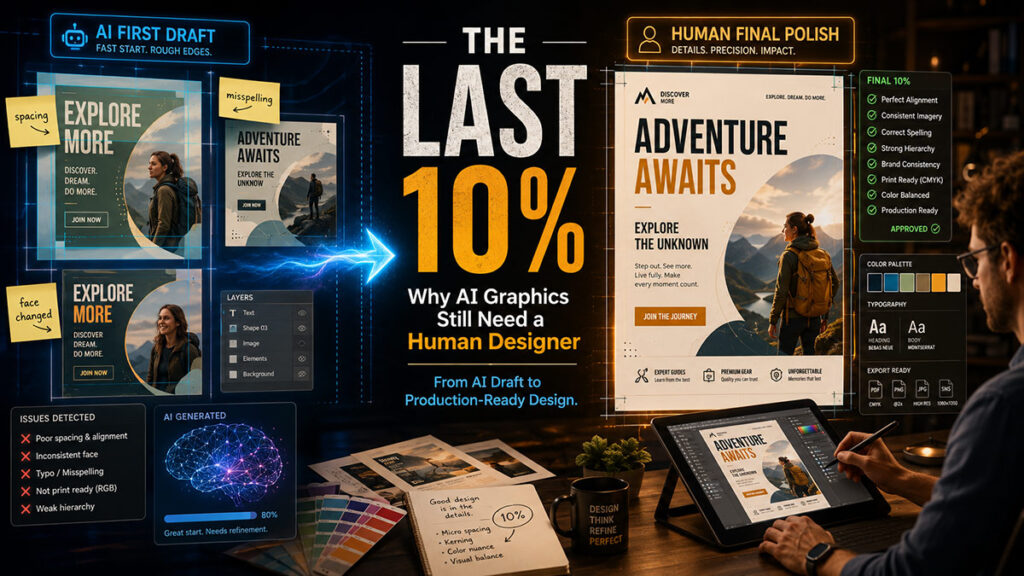
But here is the truth that many clients do not see: an AI-generated graphic is not automatically a finished professional design. It may look impressive at first glance, but the closer you look, the more you notice the small issues. The face is slightly different. The hands look strange. The text is misspelled. The logo is not clean. The spacing feels off. The image has no editable layers. The print resolution is questionable. The person in the design does not look exactly like the real person. The design looks “almost done,” but “almost done” is not the same as ready to publish.
That final stage is what I call the last 10%. And in professional design, the last 10% is often the most important part.
AI Is Great for the First Draft, Not Always the Final Draft
AI is powerful because it moves fast. A designer can ask for a campaign idea, a poster concept, a hero banner, a product mockup, or a visual direction and receive multiple options almost instantly. This is useful in real design work. For example, a designer working on a restaurant campaign can generate different background moods before choosing one.
This is real value. AI saves time in ideation.
But professional design is not only about producing something visually attractive. It is about producing something accurate. It must match the brand. It must use the right logo. It must follow the client’s instructions. It must have readable typography. It must export correctly for Instagram, print, website, ad platforms, and sometimes large-format banners. It must respect identity, copyright, and context. That level of control is where human design judgment still matters.
AI can create the direction. A designer creates the final.
The Face Problem: Why “Do Not Change the Face” Is Not Enough
One of the biggest problems in AI-generated graphics is face consistency. This matters in campaigns, brand portraits, author banners, business ads, public figure posters, wedding designs, memorial graphics, real estate ads, and any design that includes a real person.
A client may say, “Use this person’s photo but make the background more professional.” The designer may prompt the AI: “Keep the face exactly the same. Do not change identity. Do not alter facial features.” But the result can still subtly change the face. The eyes may shift. The jawline may soften. The smile may become different. Skin texture may become too smooth. The person may look like a similar person, but not the exact person.
This happens because generative AI does not simply “protect” every original pixel. It creates or reconstructs pixels based on patterns. Even when the instruction says to preserve identity, the model may reinterpret the face while trying to match lighting, style, background, or composition. That is why a prompt can reduce the risk but cannot fully guarantee perfect facial preservation.
For professional designers, this is not a small issue. If a mayoral candidate, business owner, actor, teacher, doctor, or public figure appears in a graphic, changing the face is not acceptable. It may look unprofessional, misleading, or disrespectful. A human designer must compare the AI output with the original photo, mask carefully, restore the original face when needed, retouch manually, and make sure the final person still looks like themselves.
Real-Life Use Case: Campaign Poster Editing
Imagine a client gives a designer a photo of a candidate and asks for a campaign poster. The designer uses AI to generate a clean background, extend the canvas, add lighting, or create a polished visual mood. The first result looks impressive. But then the problems appear: the candidate’s face is slightly regenerated, the suit shape has changed, the text spacing is weak, the slogan is too close to the bottom, and the AI has invented random shapes in the background.
A non-designer might say, “This looks fine.” A professional designer sees the risk.
The correct workflow is not to publish the AI image directly. The designer should bring it into Photoshop, place the original face or original body layer back where needed, clean edges, adjust shadows, fix typography, check spelling, align the slogan, balance the hierarchy, and export the final file in the correct size. AI helped, but Photoshop finished the job.
That is the real workflow today: prompt, generate, inspect, correct, polish, export.
Why Designers Still Matter
Designers do much more than decorate. They make decisions. They understand visual hierarchy, emotional tone, brand consistency, typography, spacing, contrast, accessibility, and context. They know when a design looks premium and when it looks randomly generated. They know when a face has changed too much. They know when a headline needs breathing room. They know when a client’s message is too long for a social post. They know when a design needs less noise, not more effects.
AI does not always understand these business-level priorities. It may create something beautiful but not useful. It may create something dramatic but not brand-safe. It may create something detailed but not readable. It may create something stylish but not accurate.
This is why AI is not replacing serious designers. It is changing the kind of work designers do. Instead of spending all their time on repetitive edits, designers can use AI for exploration and then spend more time on creative direction, correction, and finishing.
The Production-Ready Checklist
Before publishing any AI-assisted graphic, a designer should check:
- Is the person’s face still accurate?
- Is the spelling correct?
- Is the logo clean and not distorted?
- Is the typography readable?
- Is the layout balanced?
- Are the colors consistent with the brand?
- Are there strange hands, shadows, backgrounds, or objects?
- Is the design the correct size?
- Is the file high enough resolution?
- Are the layers editable when future changes are needed?
- Does the final result match the client’s actual message?
This checklist is where professional quality lives.
The Honest Way to Explain AI to Clients
The best way to explain AI design to a client is simple: AI helps us move faster, but it does not remove the need for professional finishing. It is like a camera, stock library, layout assistant, and idea generator combined. It can create strong raw material, but the designer still has to direct it, correct it, and prepare it for the real world.
A good designer should not promise that AI will create a perfect final poster in one prompt. A better promise is this: AI can speed up concept creation, but the final design will still be checked and finished by a human designer.
That is the difference between AI output and professional design.
Final Thought
AI is not useless, and it is not magic. It is a powerful assistant with real limitations. It can help designers create faster, but it can also introduce subtle mistakes that matter a lot in professional work. The future of graphic design is not “AI versus designer.” The future is AI plus designer.
The machine may generate the first version.
But the designer protects the quality, the identity, the message, and the final trust.