The most interesting thing about AI in design is not that it can make pretty images. The real change is bigger: AI is becoming part of the full creative workflow. It is helping designers move from idea to mockup, from mockup to layout, from layout to content, and sometimes from design to code.
For graphic designers and web designers, this creates a new type of creative process. The work no longer begins with an empty Photoshop file, a blank Figma frame, or a white website canvas. It can begin with a conversation: “Create a landing page for a fitness coach,” “Generate a social media campaign for a bakery,” “Build a clean dashboard for a finance app,” or “Make this product image look premium.”
But the important question is not, “Can AI create something?” It can. The better question is, “Can AI create something accurate, editable, brand-safe, responsive, and ready for real users?”
That is where the story becomes more practical.
AI as a Creative Co-Pilot
In graphic design, AI is useful for idea generation, layout exploration, image cleanup, background extension, mood-board creation, and campaign variations. In web design, AI is useful for wireframes, landing page drafts, copy suggestions, component ideas, code snippets, SEO recommendations, and quick prototypes.
A designer can now generate five visual directions before lunch. A web designer can turn a rough idea into a clickable prototype much faster than before. A small business owner can test campaign visuals without hiring a full production team at the first stage. This is not a small improvement. It changes the speed of creative decision-making.
But speed does not automatically equal quality.
A landing page generated by AI may look modern, but the call-to-action may be weak. A dashboard may look clean, but the spacing may fail on mobile. A campaign graphic may look attractive, but the headline may not match the brand voice. A generated section may work visually, but the code may not be maintainable for a real development team.
That is why AI works best when a designer treats it as a co-pilot, not an autopilot.
Real-Life Use Case: Landing Page Creation
Imagine a client asks for a landing page for a new skincare brand. The old workflow might look like this: research competitors, create mood boards, write rough copy, wireframe the page, design the layout, prepare assets, send to the client, revise, then hand off to a developer.
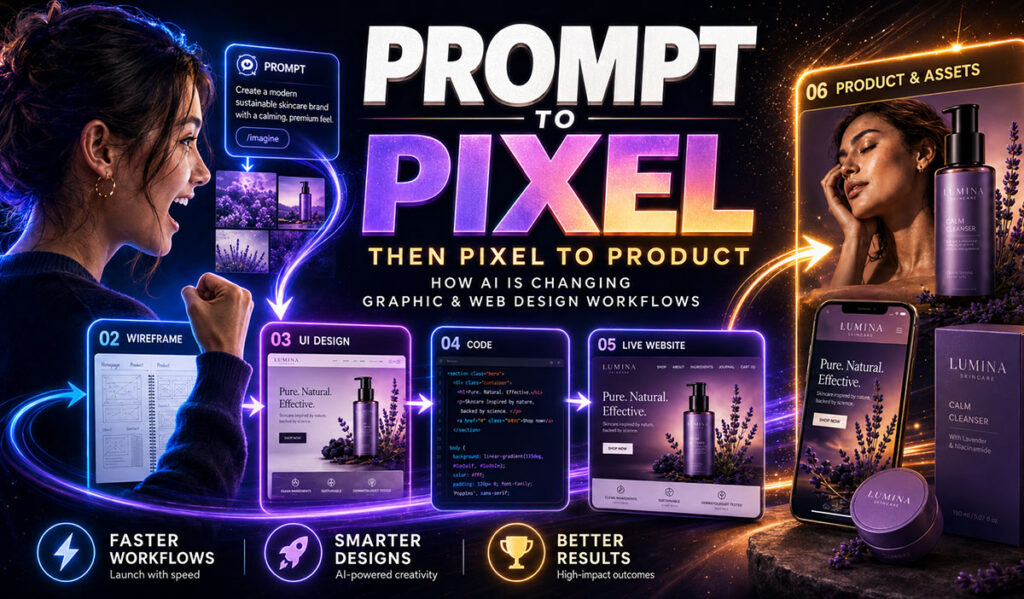
With AI, the workflow can move faster. The designer can ask AI to generate audience ideas, page sections, headline options, visual references, hero layout concepts, and product benefit blocks. In Figma or a similar tool, AI can help create a first UI direction. In a web platform, AI can suggest sections, copy, or even components.
Now the designer is not starting from zero. The designer is judging, refining, and improving.
But the landing page is still not ready just because AI made it. The designer must check whether the layout works on desktop and mobile. The brand colors must match. Product claims must be accurate. The typography must feel premium. The images must not misrepresent the product. The code must load fast. Forms must work. Buttons must be accessible. SEO headings must make sense. The site must not only look good in a screenshot; it must work for real users.
This is the difference between a prototype and a product.
The Web Design Limitation: Screenshots Are Not Systems
AI can create beautiful UI screens, but a website is not just a picture. A website is a system. It has breakpoints, interactions, CMS content, accessibility rules, performance requirements, browser behavior, analytics, forms, security, and future maintenance.
A generated website mockup might look polished at 1440 pixels wide, but what happens at 390 pixels on a phone? What happens when the headline becomes longer? What happens when the client uploads a different image? What happens when the CMS has 200 blog posts? What happens when the button text wraps into two lines?
These questions are boring to a machine but important to a professional designer and developer.
This is why human review still matters in web design. AI can help create the first structure, but designers and developers must test responsiveness, spacing, usability, and maintainability.
AI Helps With Repetition, Humans Help With Taste
A lot of design work is repetitive. Resizing graphics. Creating variations. Removing backgrounds. Writing first-draft copy. Building similar page sections. Testing different headlines. Preparing mockups. Cleaning small image issues.
AI is excellent at helping with this kind of work.
But taste is different. Taste is knowing when a layout has too much noise. Taste is knowing when a design feels cheap even if it has many effects. Taste is knowing when the client’s message is buried under decoration. Taste is knowing when the hero image is emotionally wrong. Taste is knowing when less design creates more trust.
AI can imitate patterns, but designers understand intention.
A good designer asks: What is the purpose of this design? Who needs to trust it? What should the viewer feel first? What should they read first? What action should they take? What must never be changed?
That last question is especially important. In many real projects, there are things AI must not alter: a person’s face, a logo, a legal disclaimer, a product shape, a campaign slogan, a brand color, or a price. AI may not always protect those details. The designer must.
Graphic Design and Web Development Are Becoming Closer
AI is also blurring the line between design and development. Designers can now generate UI ideas, interactive prototypes, and sometimes front-end code. Developers can generate components from design references. Marketing teams can ask for campaign pages and content blocks quickly.
This does not mean everyone becomes a professional designer or developer overnight. It means more people can create drafts, and professionals will spend more time reviewing, refining, and connecting the pieces.
In the future, the best designers may not be the people who only know how to prompt. They will be the people who know what to do after the prompt. They will know how to judge output, repair weak areas, keep brand consistency, and prepare final assets for the real world.
A Practical AI Design Workflow
A smart AI-assisted workflow can look like this:
- Start with the brief.
- Use AI to explore ideas.
- Choose the strongest direction.
- Bring the output into a professional tool.
- Restore original faces, logos, and brand assets.
- Fix typography and spacing.
- Check mobile and desktop layouts.
- Test readability and accessibility.
- Export in the correct size and format.
- Get human approval before publishing.
This workflow respects AI’s strengths without pretending it has no weaknesses.
The Future Is Faster, Not Fully Automatic
AI will continue improving. It will become better at preserving identity, producing editable layers, generating layouts, and helping with code. But professional work will still need human responsibility. Clients do not only pay for a pretty output. They pay for judgment, trust, accuracy, and the confidence that the final design will not embarrass the brand.
AI can make the design process faster.
A designer makes it safer, clearer, and more professional.
That is the real future: not prompt to publish, but prompt to pixel, then pixel to product.